
The Disputes Dashboard is purpose-built to help you understand the full impact of chargebacks and pre-arbitrations, including dispute frequency, recovery success, and the net financial outcome to your business.
This dashboard combines performance tracking, loss analysis, and program evaluation, making it invaluable for finance, risk, and chargeback management teams.
KPI Section (Top)
The KPI section is based on the last complete month of data and is calculated from deduplicated dispute-level data. Each KPI includes time comparisons, colour-coded trend arrows, and trendlines.
The twelve KPIs are split across three tabs, which follow the lifecycle of a dispute: what was disputed, what you got back, and what you were left with. If a metric you expect is missing, it is almost certainly on one of the other two tabs rather than absent.

Disputed tab
What came in. Start here to size the problem.
|
KPI |
Purpose |
|---|---|
|
Dispute Rate |
Understand your chargeback frequency as tracked by networks like Visa, Mastercard, Amex, and Discover. |
|
Disputed Transactions |
Understand how many transactions were involved in disputes. |
|
Disputed Sales |
Gauge the total dollar value impacted by disputes. |
|
Average Dispute |
Evaluate the average value of disputed transactions vs. typical sales. |
Recovered tab
What you won back. Read this against the Disputed tab to judge whether your dispute response is working.
|
KPI |
Purpose |
|---|---|
|
Win Rate |
Assess how often disputes are resolved in your favor. |
|
Recovered Transactions |
Understand how many disputes were ultimately reversed or neutralized through dispute resolution. |
|
Recovered Sales |
See how much of disputed revenue was saved. |
|
Average Win |
Understand if high-value disputes are being won, which is critical for ROI on dispute management. |
Net Disputed tab
What you actually lost. This is the tab to quote in financial reporting, since it is the only one that reflects the outcome rather than the activity.
|
KPI |
Purpose |
|---|---|
|
Net Dispute Rate |
Know the percentage of transactions lost to all transactions. |
|
Net Disputes |
Reflects how much of your disputed sales were not recovered. |
|
Net Disputed Sales |
Same as Net Disputes, focused on dollar impact. |
|
Average Loss |
Assess if you're losing high-value disputes, which is key for financial impact modeling. |
Gauge Charts (Dispute Rates by Network)
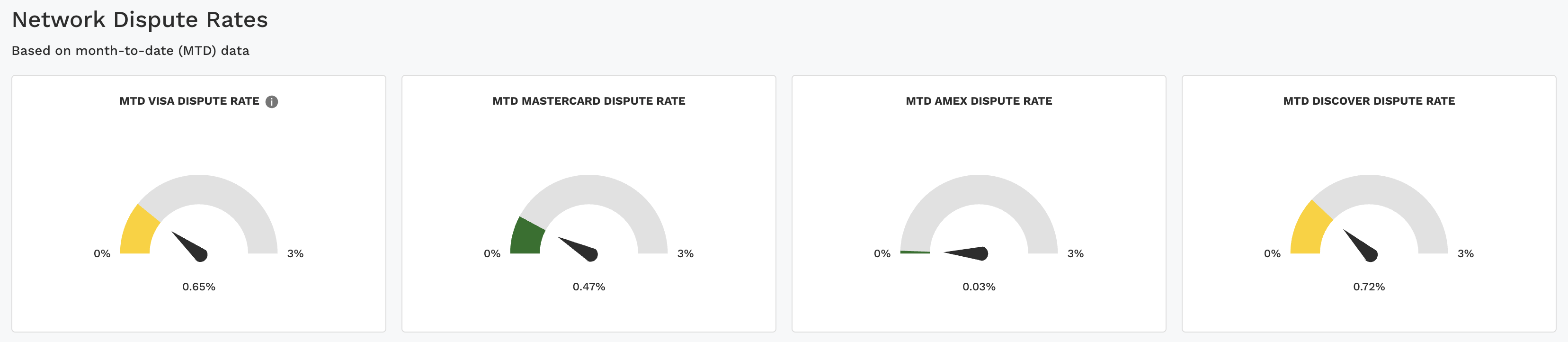
Four gauges run across this section, all based on month-to-date (MTD) data rather than the last complete month used by the KPIs above. Three of them are straight dispute rates. The fourth is not:
-
MTD VAMP Ratio
-
MTD Mastercard Dispute Rate
-
MTD AmEx Dispute Rate
-
MTD Discover Dispute Rate
There is no Visa dispute rate gauge. Visa retired the legacy VDMP and VFMP programs in favour of VAMP (Visa Acquirer Monitoring Program), so Visa exposure is monitored through the VAMP Ratio instead. That ratio is not interchangeable with the other three: it is measured against Visa Card-Not-Present transactions only, and its numerator includes fraud records as well as disputes. Comparing it side by side with the Mastercard, AmEx, and Discover gauges will mislead you.
For the formula, the acquirer-specific assumptions behind it, and Visa's thresholds, see VAMP Ratio. The dashboard banner also links to it directly.
The three network dispute rate gauges each run from 0% to 3%, with the arrow showing the current rate. The color bands highlight the health of the rate:
-
🟢 Green (0–0.5%) – Healthy range, disputes are low and within expectations.
-
🟡 Yellow (>0.5–1%) – Slightly elevated, worth monitoring for changes.
-
🟠 Orange (>1–1.5%) – Noticeably high, may indicate early issues or risks.
-
🔴 Red (>1.5%) – Critical level, disputes are high and likely need immediate action.
This structure allows teams to quickly identify which networks are stable and which may require further investigation.
Charts Tab (Dynamic Charts)
The Charts tab holds two interactive trend charts, each with its own Type, Group, Top N, and Date Granularity controls. The Date Range for charts and data defaults to the last 6 months including the current month.
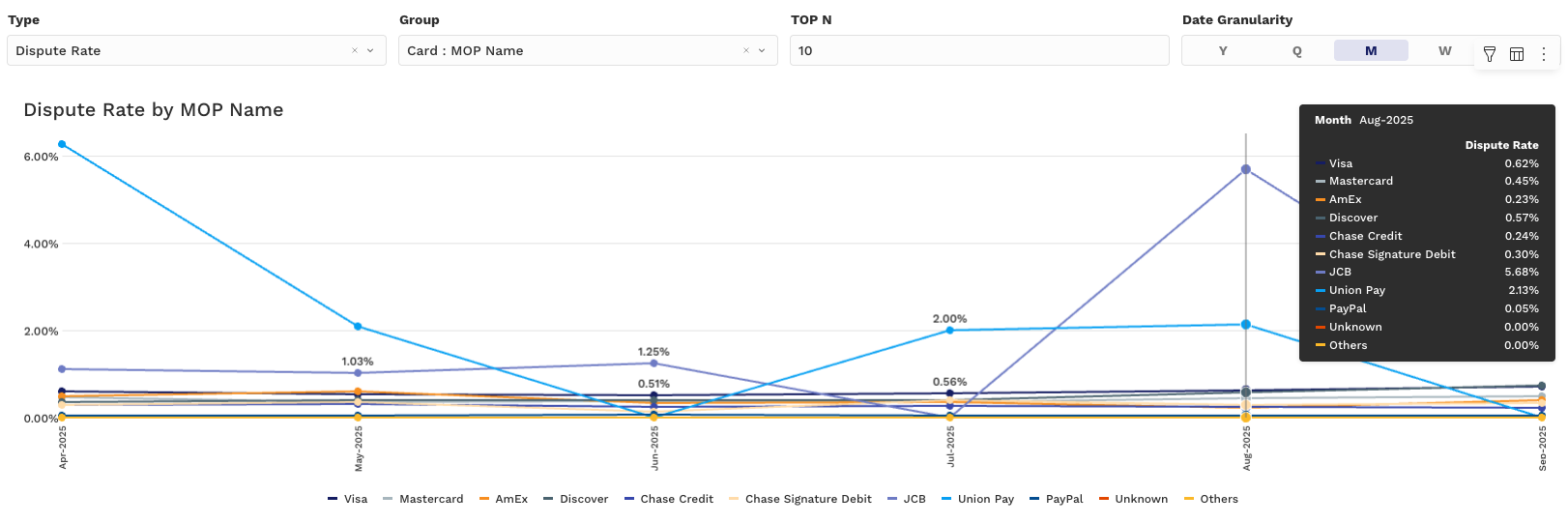
Chart 1: Dispute Performance Over Time
-
Type Selector:
-
Dispute Rate
-
Win Rate (Count) — disputes won as a share of disputes raised
-
Win Rate (Amount) — disputed dollars recovered as a share of dollars disputed
-
Net Dispute Rate
-
-
Y-Axis: Selected Rate (%)
-
X-Axis: Time (Month, Week, etc.)
-
Grouped by: PSP, MID, Card Type, Issuer, or Reason Code. Defaults to Card : MOP Name, Top N 10, Monthly.
Win Rate splits into a count-based and an amount-based version because the two often disagree. Winning most of your small disputes while losing the large ones produces a healthy Win Rate (Count) and a poor Win Rate (Amount). Check both before concluding that dispute response is working.
Charts 2 & 3: Disputed, Recovered & Net Loss Trends
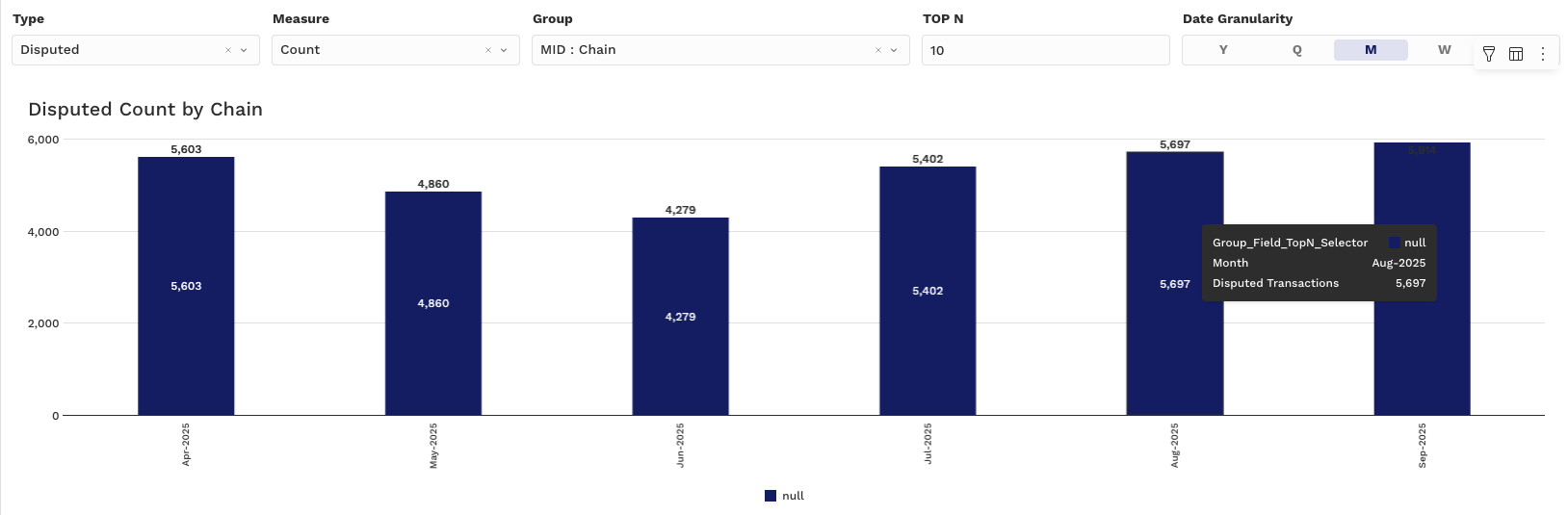
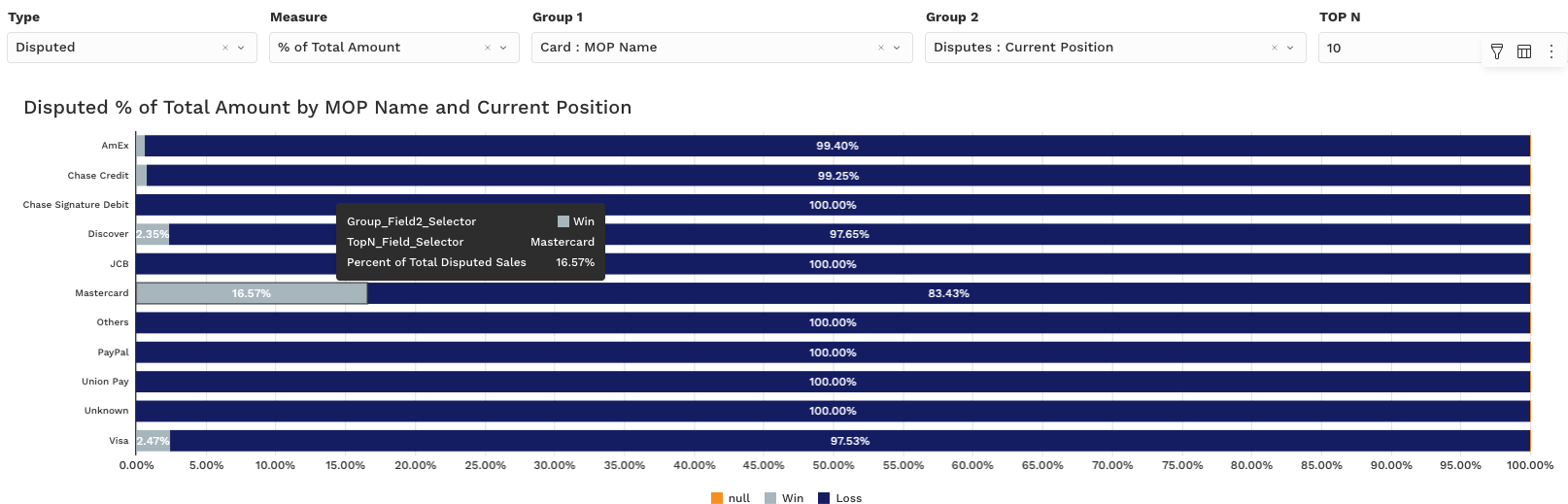
Type Selector:
-
Disputed
-
Recovered
-
Net Disputed
Measure Selector:
-
Count
-
Amount
-
% of Total Count
-
% of Total Amount
Use these to:
-
Compare recovery trends across business units
-
Surface segments with frequent unresolved disputes
-
Spot patterns by Issuer, BIN, or MOP
Click elements in the charts to drill down or apply filters to the rest of the dashboard.
Pivot Tab (Dynamic Pivot Tables)
The pivot view enables granular analysis of dispute data with full control over grouping and aggregation, ideal for deep operational audits and finance reconciliation.
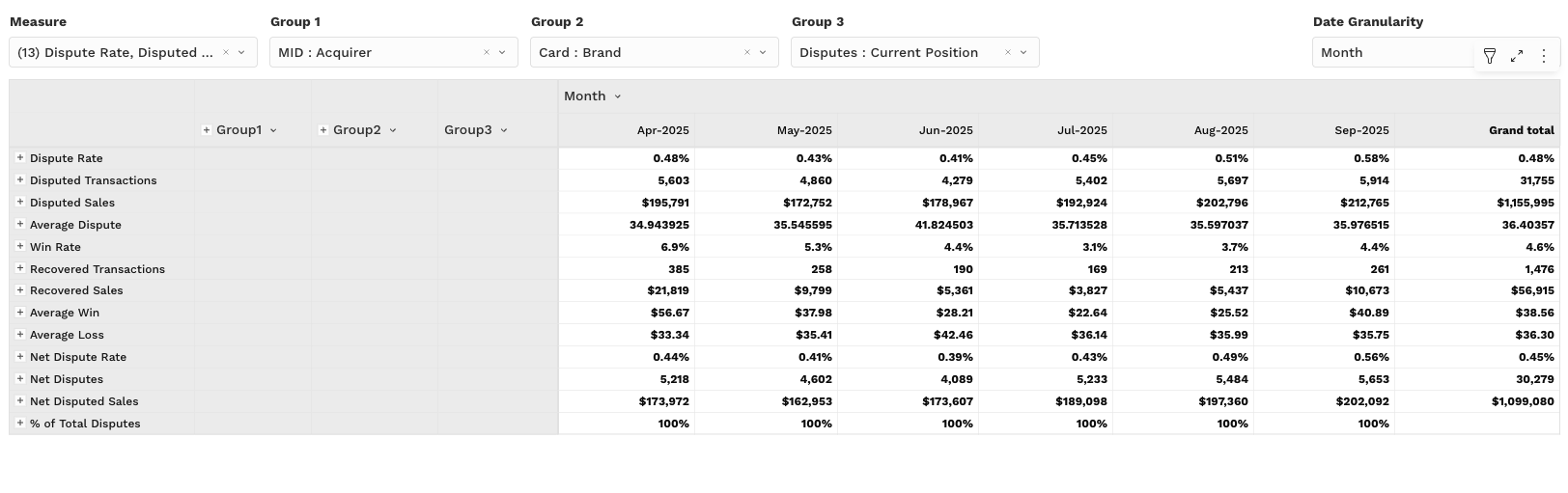
Pivot Table Metrics (Values):
-
Dispute Rate
-
Disputed Transactions
-
Disputed Sales
-
Average Dispute
-
Win Rate (Count)
-
Win Rate (Amount)
-
Recovered Transactions
-
Recovered Sales
-
Average Win
-
Average Loss
-
Net Dispute Rate
-
Net Disputes
-
Net Disputed Sales
-
% of Total Disputes
Key Interactions:
-
Group by Card Brand, BIN, Issuer, Reason Code, PSP, MID
-
Filter by time, amount range, or channel
-
Export to CSV for finance or partner teams
Ideal for answering: "Which card brand has the lowest win rate on high-dollar disputes?" or "Where are we losing more than we're winning?"
Filtering Tips
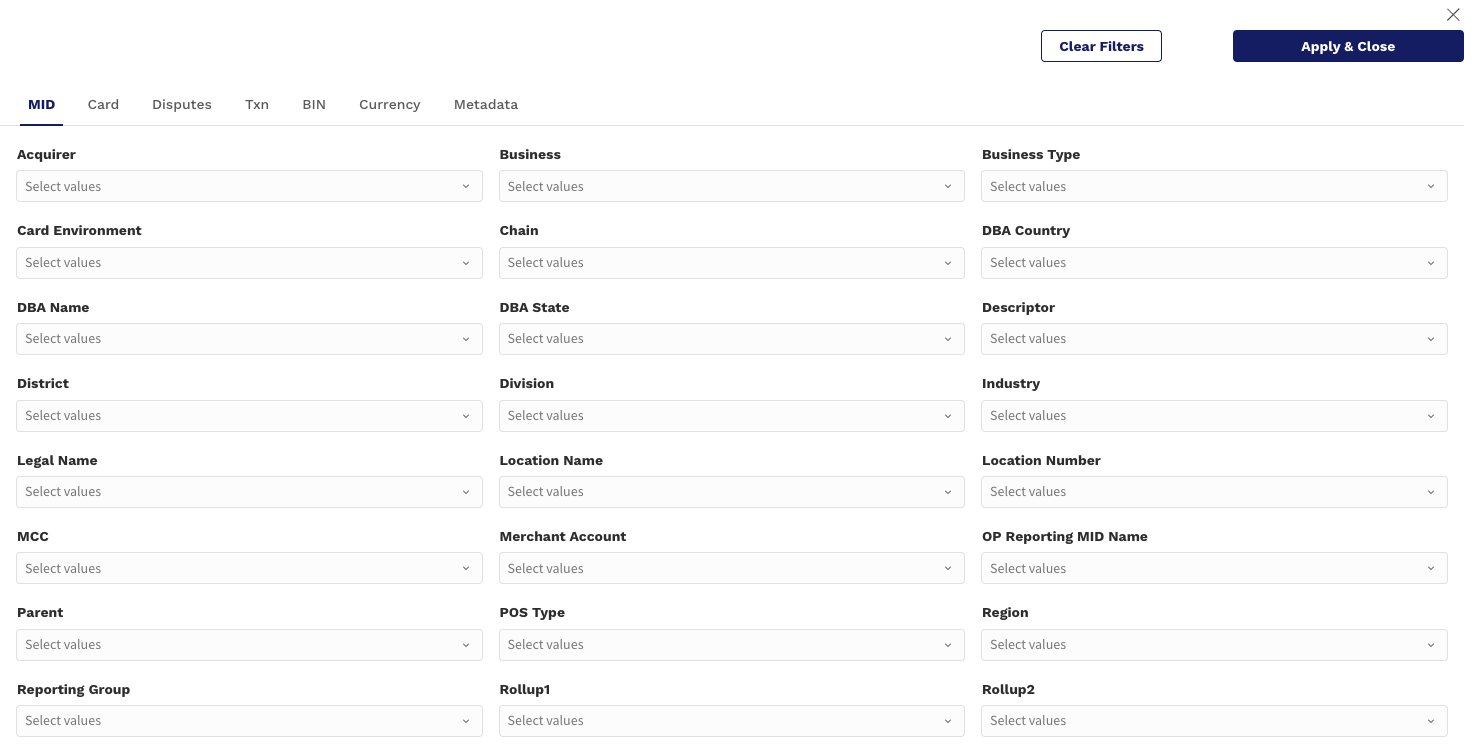
Customize your dispute insights using:
-
Date Range: Focus on closed cases for stable Win Rate (e.g., 90+ days ago). Defaults to the last 6 months including the current month.
-
Group Filters: Narrow in on Issuers, Regions, Acquirers, or specific Reason Codes
-
Top N: Focus on your top contributors to dispute volume or loss
Use Case Example:
"Which MIDs are generating the highest net losses from chargebacks in the last 3 months?"
Set Date Range = last 90 days
Filter for Net Disputed > $0
Group by MID
Sort Pivot by Net Disputed Sales or Average Loss