
The Fees Dashboard is built to give you deep visibility into the cost of processing payments — including total fees, effective rate, downgrade performance, and cost breakdowns across acquirer, network, and interchange.
Whether you're reconciling processor invoices, identifying optimization opportunities, or managing cost-of-sales, this dashboard helps you quantify every dollar spent per transaction.
KPI Section (Top)
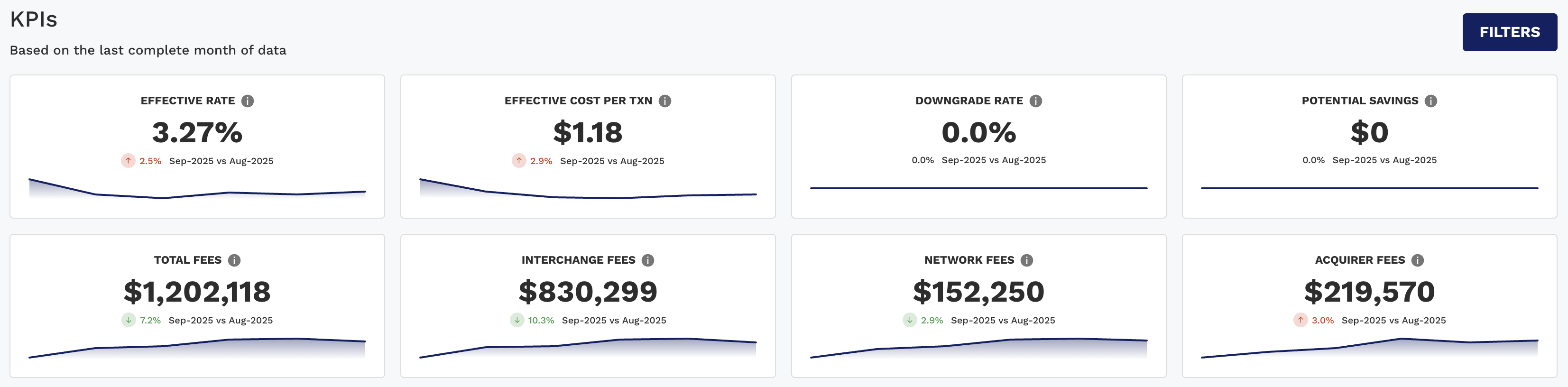
This section displays essential cost-related metrics to help you quickly evaluate your fee efficiency and areas of potential savings.
|
KPI |
Description |
|---|---|
|
Effective Rate |
Total fees ÷ Net Sales — your blended cost of processing. |
|
Effective Cost Per Unit |
Average dollar cost per fee unit. Watch it alongside Effective Rate: a rise here with a flat rate points to fixed, per-item charges rather than a change in sales mix. |
|
Downgrade Rate |
% of transactions that downgraded from qualified interchange categories. |
|
Potential Savings |
Estimated $ that could be saved by optimizing downgrade or fee scenarios. |
|
Total Fees |
Combined dollar amount of all fee categories. |
|
Interchange Fees |
Total cost paid to issuer banks. |
|
Network Fees |
Total cost paid to the card brand networks. |
|
Acquirer Fees |
Processor/acquirer-specific charges. |
Period-over-period comparisons, color-coded arrows, and trendlines help users track how fee performance is evolving.
Charts Tab (Dynamic Charts)
The chart section features stacked bars and line chart to visualize fee composition and trends in an intuitive way.
Dynamic Charts 1–3 (Segmented Views)
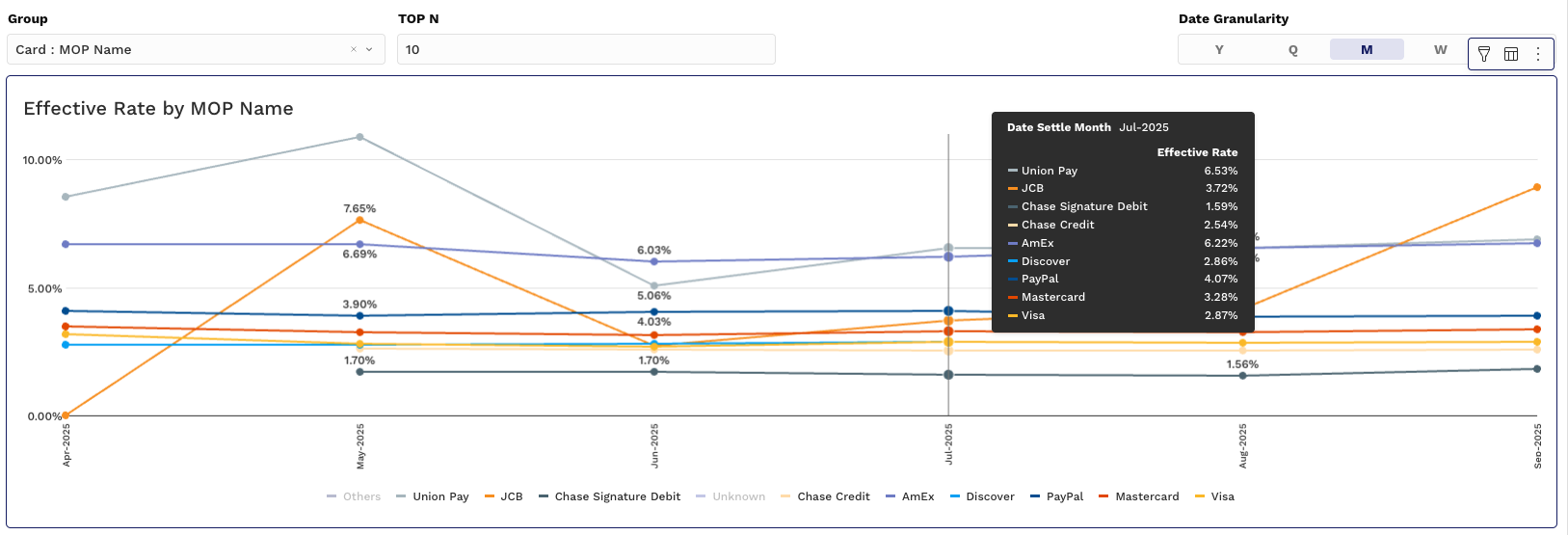
Chart 1: Effective Rate by Group
-
Y-Axis: Effective Rate (%)
-
X-Axis: Time (Month, Week, etc.)
-
Grouping: By Acquirer, Merchant ID, MOP, or Card Type
Charts 2 & 3: Fee Distribution
Allow you to analyze fee totals by business dimensions.
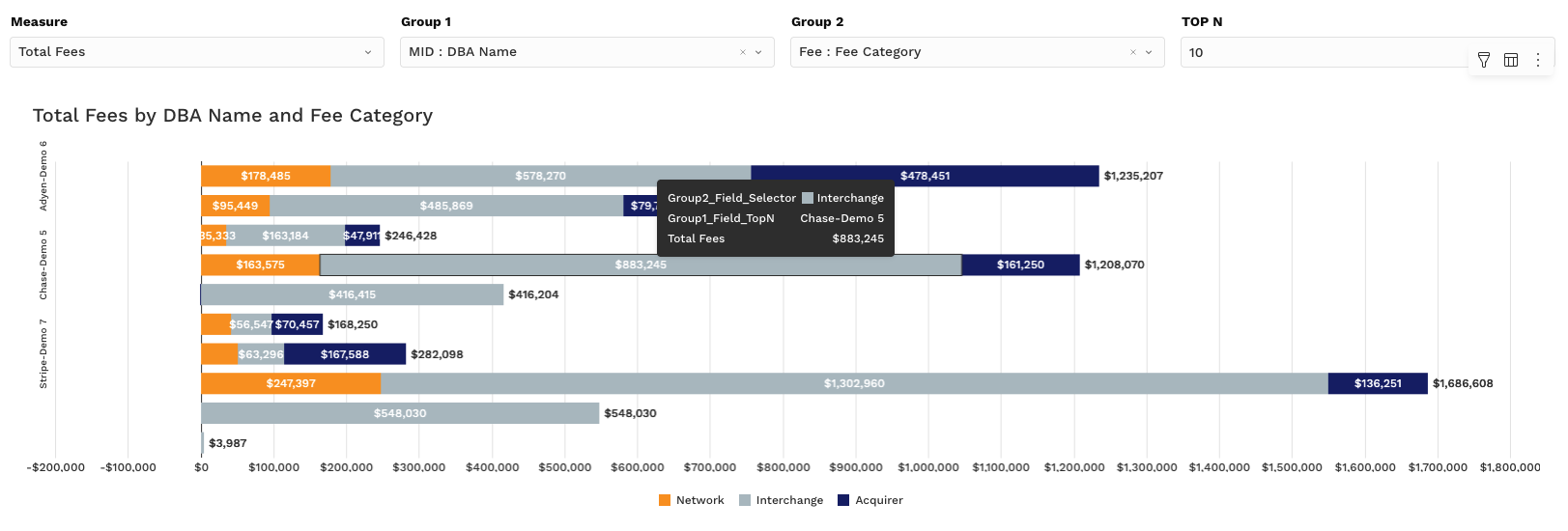
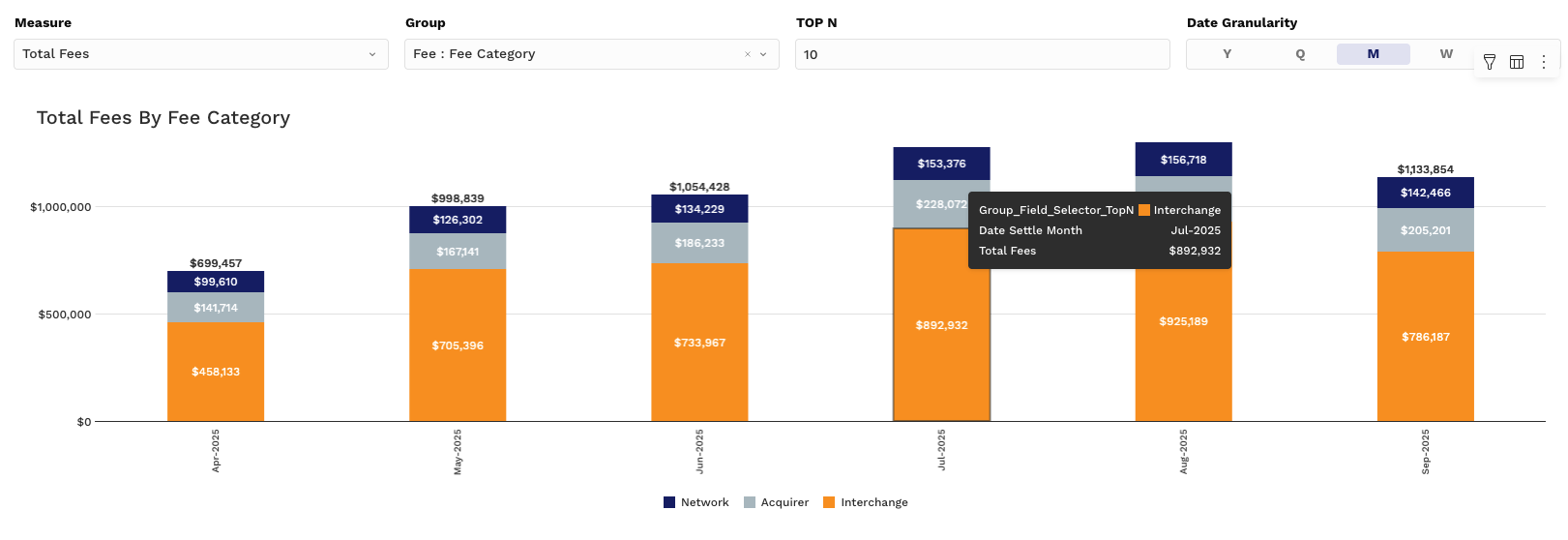
Measure Controller Options:
-
Total Fees – Raw dollar value
-
% of Total Fees – Contribution by group (e.g., which MIDs or payment methods drive the most cost)
Group controls and granularity options make these charts flexible and powerful for cost investigation.
Pivot Tab (Dynamic Pivot Tables)
This section gives users a line-item breakdown of fees with grouping and drill-down capabilities, ideal for reconciliation, performance tracking, and vendor analysis.
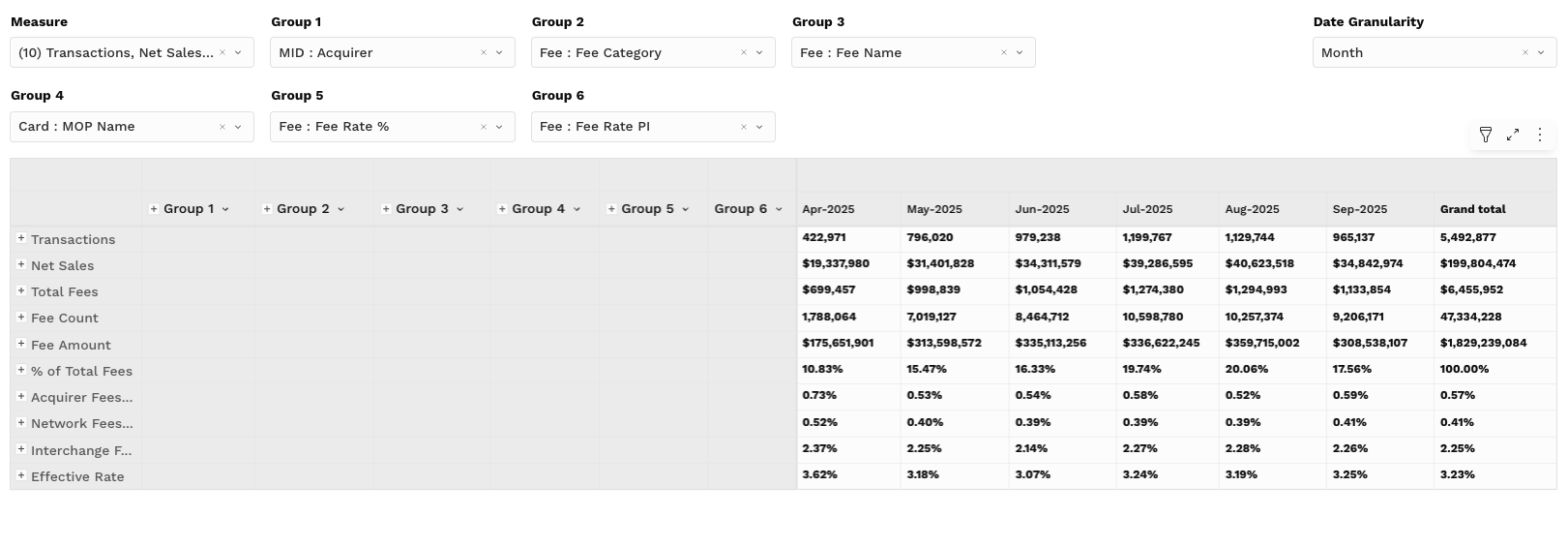
Pivot Table Metrics (Values):
-
Transactions
-
Net Sales
-
Total Fees
-
Fee Unit Count — How many billable fee units fall into the group; use it to see how often a fee is applied, not just what it totals.
-
Fee Unit Amount — The dollar value attached to those units; pair it with Fee Unit Count to tell a pricing change from a volume change.
-
% of Total Fees
-
Effective Acquirer Rate — Acquirer fees as a percentage of sales, for isolating processor pricing from the blended rate.
-
Effective Network Rate — Network fees as a percentage of sales; useful when card brand assessments shift.
-
Effective IC Rate — Interchange as a percentage of sales, usually the largest single driver of the blended rate.
-
Effective Rate
-
Effective Cost per Unit — All fees divided by fee units, in dollars; the headline per-unit figure to compare against Effective Rate.
-
Acquirer Cost per Unit — The acquirer share of that per-unit cost, where most flat per-item charges sit.
-
Interchange Cost per Unit — The interchange share expressed per unit rather than as a percentage of sales.
-
Network Cost per Unit — The network share per unit, where small fixed assessments tend to show up first.
The “per unit” family expresses cost per fee unit rather than as a share of sales, which is what makes a fixed-fee increase visible when a rate-based view would hide it.
Interactions:
-
Group by Acquirer, Merchant ID, Card Type, BIN, or Issuer
-
Set up to 6 grouping levels, each chosen independently — start broad (for example Acquirer) and add levels to drill toward the specific fee code or BIN driving a cost you are investigating.
-
View data across time intervals (Month, Week, Day, etc.)
-
Export for reconciliation or invoice validation
This view is ideal for uncovering cost trends, verifying processor charges, and identifying downgrade patterns.
Filtering Tips
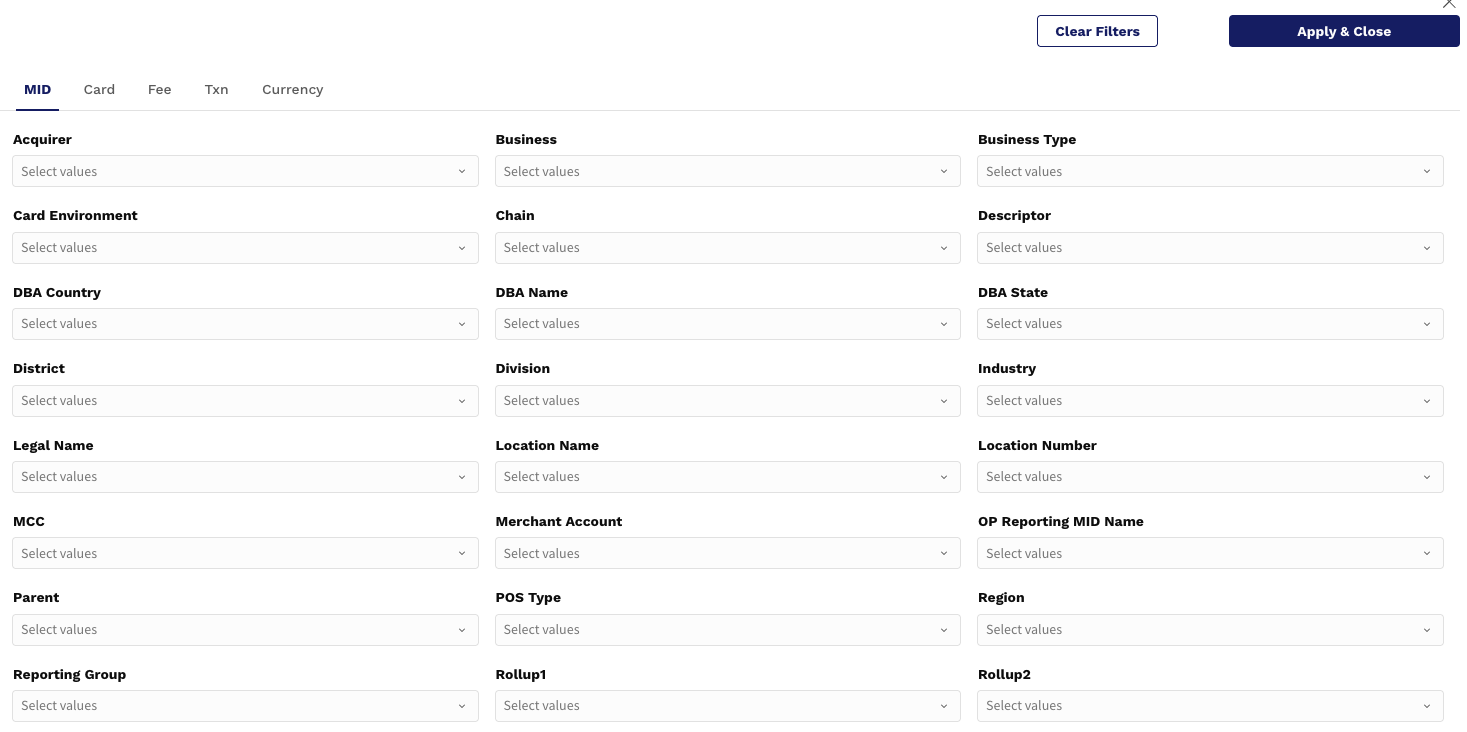
Customize your view of fees with powerful filters:
-
Date Range: Focus on current cycle, quarter, or year-to-date
-
Group Filters: Filter by Currency, Acquirer, MOP, Card Brand, etc.
-
Top N: Analyze only the highest contributing groups (e.g., top 10 acquirers by fee amount)
Use Case Example:
“Which PSPs are contributing most to our effective cost, and how much of it is due to interchange?”
Go to Pivot Tab
Group by Acquirer
Compare Total Fees vs. Interchange Fees
Review Effective Rate trend in Chart 1