
The Overview Dashboard is your executive summary of the entire payment lifecycle, a single page that brings together key metrics from sales, authorizations, fees, refunds, and disputes.
Use this dashboard as your daily command center or as a starting point for deeper exploration across other tabs. It provides a balanced view of volume, cost, efficiency, and risk.
The page has three parts: a KPI strip at the top, a Charts tab showing how the headline metrics have moved, and a Data tab for breaking those same metrics down by acquirer, payment method, or card type.
Two date controls, not one. The KPI tiles always reflect the last complete month and are not affected by any date selector. The Date Range for Charts and Data control below them drives the Charts and Data tabs only, and defaults to the last 6 months including the current month. If a KPI and a chart appear to disagree, this is usually why.
KPI Section (Top)
Fourteen curated KPIs, pulled from across all dashboards. Each is displayed with a month-over-month comparison, a colour-coded trend arrow, and a sparkline showing directional change. Hover the info icon on any tile for its definition.
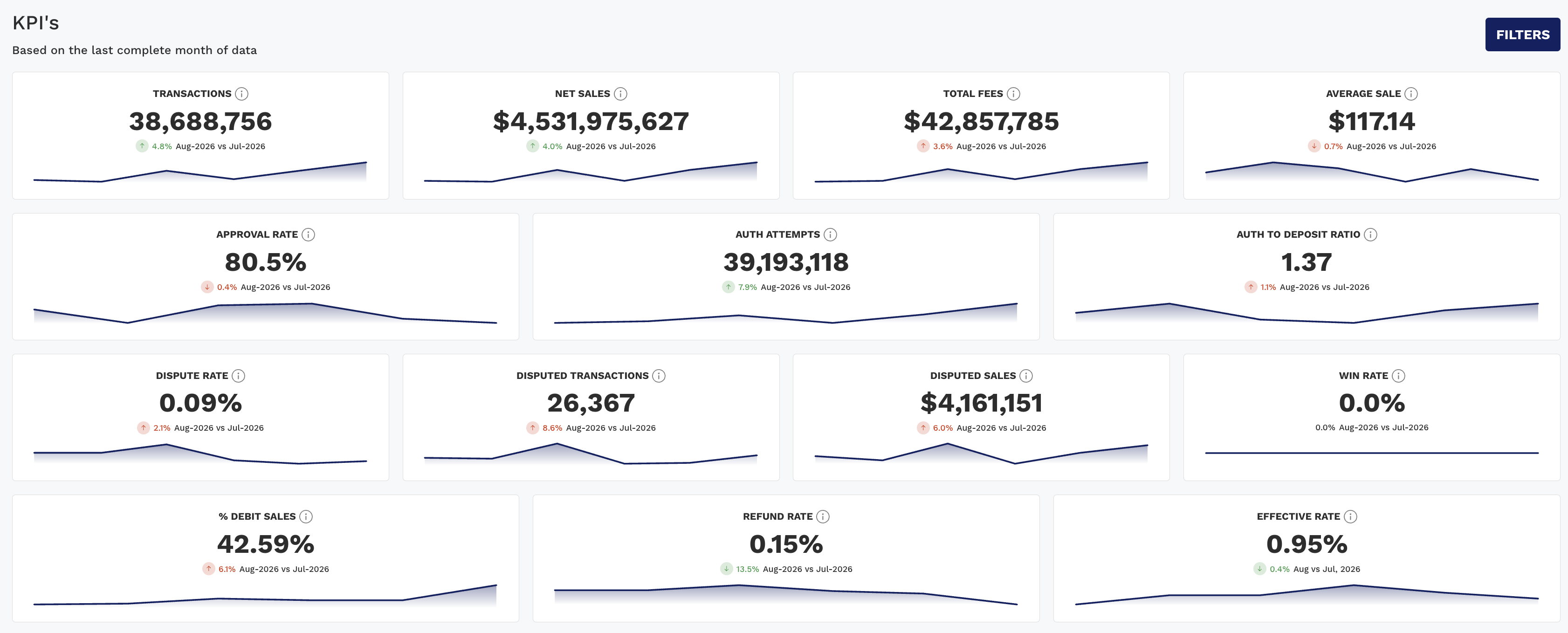
The tiles are arranged in four rows, each covering one area of the business. Reading a row across tells you more than reading any single tile.
Volume and value
|
KPI |
Description |
|---|---|
|
Transactions |
Total number of settled transactions |
|
Net Sales |
Total dollar value of sales less refunds |
|
Total Fees |
Sum of all fees: interchange, network, acquirer, and others |
|
Average Sale |
Net Sales ÷ total transactions. Note this divides by all transactions, refunds included, so it is not the average value of a sale in isolation |
Read Transactions and Net Sales together. If Net Sales fell while Transactions held, your ticket size dropped rather than your customer volume.
Authorization
|
KPI |
Description |
|---|---|
|
Approval Rate |
Approved Auths ÷ Total Auth Attempts |
|
Auth Attempts |
Total number of authorization requests in the period |
|
Auth to Deposit Ratio |
Auths ÷ Settled Transactions (excluding Pay by Bank MOPs, AmEx, Discover, and PayPal) |
A falling Approval Rate alongside rising Auth Attempts usually means retries are climbing rather than issuers becoming stricter. A low Auth to Deposit Ratio points at settlement rather than authorization.
Disputes
|
KPI |
Description |
|---|---|
|
Dispute Rate |
Disputed transactions ÷ gross sale transactions. Excludes refunds and conveyed volume, so it is not a share of all settled transactions |
|
Disputed Transactions |
Count of transactions involved in a dispute |
|
Disputed Sales |
Total dollar amount associated with disputes |
|
Win Rate |
% of disputes that were reversed (final or initial outcomes) |
These four are headline figures only. For recovery detail, net loss, and the network-level view including VAMP Ratio, use the Disputes Dashboard.
Rates and mix
|
KPI |
Description |
|---|---|
|
% Debit Sales |
Debit sales as a share of Net Sales, excluding conveyed volume. A shift here moves your blended cost even when nothing else changes, since debit and credit price differently |
|
Refund Rate |
Refund dollar amount ÷ gross sales dollar amount. This is an amount ratio, not a count of refunded transactions |
|
Effective Rate |
Total Fees ÷ Net Sales, your blended cost to process payments |
This dashboard includes metrics from all major performance areas and can be filtered by PSP, card brand, method of payment, merchant group, or issuer.
Charts Tab
Four charts, each pairing a volume bar with a rate line so you can see whether a rate moved because the numerator changed or because the denominator did. Every chart has its own Date Granularity control (Y / Q / M / W / D, defaulting to Month).
|
Chart |
What it answers |
|---|---|
|
Net Sales and Effective Rate by Month |
Is our cost to process moving with volume, or independently of it? An Effective Rate climbing while Net Sales is flat is a mix or qualification problem, not a growth problem |
|
Auth Attempts and Approval Rate by Month |
Is approval performance holding as attempt volume changes? Watch for the rate falling as attempts rise, which usually signals retry behaviour |
|
Disputed Transactions and Dispute Rate by Month |
Are disputes growing faster than the business? A flat rate with rising counts is normal growth; a rising rate is not |
|
Total Fees by Month |
Absolute fee spend over time, without a paired rate |
The first three charts carry a Type control that switches the bar between Amount and Count. Switching it changes what the chart is called as well as what it plots, so "Net Sales and Effective Rate" becomes "Transactions and Effective Rate" on Count. Use Amount when the question is about dollars and Count when it is about behaviour.
Total Fees by Month has no Type control, only granularity.
Data Tab
The KPIs and charts show the portfolio as a whole. The Data tab breaks the same metrics down so you can see which acquirer, payment method, or card type is driving a movement.
Controls:
-
Measure: multi-select. Sixteen measures are available and six are selected by default (Transactions, Net Sales, Total Fees, Approval Rate, Dispute Rate, Effective Rate). The rest, including Average Sales, Auth Attempts, Auth to Deposit Ratio, Disputed Transactions, Disputed Sales, Win Rate, % Debit Sales, and Refund Rate, are one click away.
-
Groups: up to three levels, each set independently. Defaults to MID : Acquirer, then Card : MOP Name, then BIN : Credit Debit, which answers "who processed it, how was it paid, and was it credit or debit".
-
Date Granularity: defaults to Month, and sets the column periods.
ACH Returns Count and ACH Returns Amount are available here and nowhere else on the dashboard. If you need ACH return visibility, the Data tab is the only place on this page that offers it.
How to Use This Dashboard
-
Start with the KPI strip
Read each row across rather than scanning tiles individually, since the tiles in a row are meant to be interpreted together. -
Move to Charts when a tile looks wrong
A month-over-month arrow tells you something changed but not whether it is a trend. The Charts tab over six months usually settles that in one glance. -
Spot opportunities or red flags
-
A rising Dispute Rate may require immediate investigation
-
A low Auth to Deposit Ratio could indicate settlement issues
-
A rising Effective Rate with flat volume points at cost, and is worth following into the Fees or Interchange Savings dashboards
-
-
Use the Data tab to assign the cause
Once you know what moved, group by acquirer or MOP to find out where it moved, then take it to the dashboard that owns that area.
When to Use
|
Use Case |
Why Overview Helps |
|---|---|
|
Leadership Reporting |
See the full business picture in one place |
|
Weekly Ops Reviews |
Quickly identify areas that need attention |
|
Monthly Recaps |
Assess health across teams without toggling dashboards |
|
Routing Optimization |
Monitor Approval Rate, Effective Rate, and % Debit Sales in tandem |
|
Chargeback Management |
Track Dispute Rate, Win Rate, and Disputed Sales in context with other KPIs |